1. Alerts for Imposter Scams
We have recently identified several potential cases of fraud involving individuals or entities misusing the name and logo of “Rakuten Securities” or “Rakuten Hong Kong” to conduct illegal fundraising activities. Rakuten Securities Bullion reminds customers not to make money deposit or transfers to suspicious emails, websites or callers, and not to provide any personal information to such persons. If you suspect that any company or personal information has been disclosed to a suspicious third party, or wish to verify whether a communication is genuinely from Rakuten Securities Bullion, please contact us at (852) 2119-7631.
2. Important Security Notice
Please be aware that Rakuten Securities Bullion Hong Kong Limited (“Rakuten Securities Bullion”) will never request your trading account information, including login IDs and passwords, via hyperlinks in SMS or email. To ensure security of your trading account, do not disclose your account login information to any unverified websites, and always access directly through our official website. If you have any doubts about a link, please contact us immediately.
Fund Deposit & Withdrawal

FORMS, POLICIES AND DISCLAIMERS

FUND DEPOSIT

Funding your account is fast, safe and secure at Rakuten Securities Bullion. Whether you are looking to deposit your initial capital or top up your account balance to seize new market opportunities, we support 4 convenient methods including eDDA Fast Deposit, FPS, bank transfer and (e-)cheques, whichever suits your needs.

eDDA Fast Deposit

*For Hong Kong dollar (HKD) deposit ONLY

References
1. Login to Client Portal
2. Select “Register eDDA” button under “Bank Transfer” and set up electronic Direct Debit Authorization (eDDA) for your bank account to Client Portal (required for first use)
3. Submit deposit instruction on Client Portal
4. Funds will be credited to your Rakuten MT4 tradding acocunt in a few minutes

Processing Time
In a few minutes

FAQ
What is eDDA?

eDDA Deposit is a quick and convenient deposit method utilizing the "FPS" system. Once the bank account authorisation is completed, customers can initiate deposits through the Client Portal, allowing funds to be transferred directly from their bank account to Rakuten MT4 trading account. FPS, or "The Faster Payment System," is an online payment platform introduced by the Hong Kong Monetary Authority. Please note that eDDA only supports deposits in HKD.
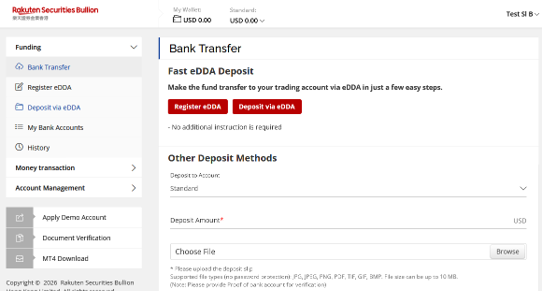
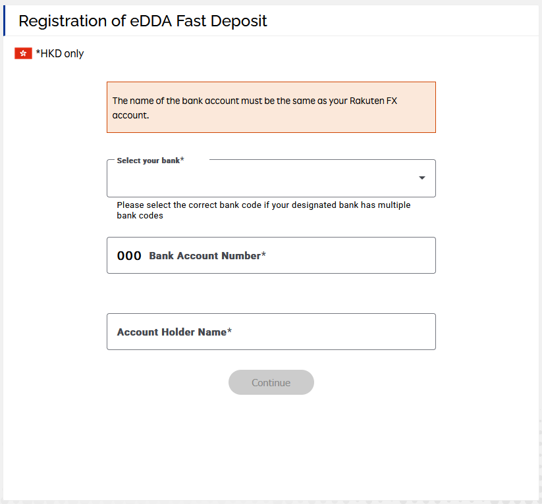
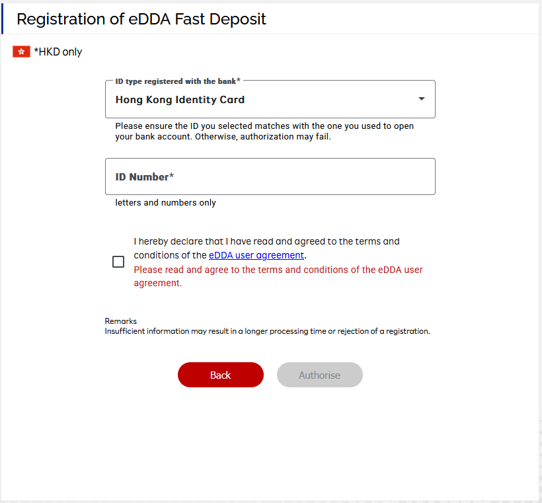
How do I set up eDDA Fast Deposit?

1. Login to Client Portal
2. Select "Register eDDA"
3. Input all required fields on the page (please note the name of the bank account must be the same as your Rakuten MT4 account)
4. Read and agree to the terms and conditions of eDDA user agreement
5. Select “Authorize”

Where can I access the Client Portal?

You can login to Client Portal here: https://customer.bullion.rakuten.com.hk/ams/login

How long will it take for the bank authorization for eDDA to be approved?

The authorization is usually approved within a few minutes; however, it may take up to 1 – 5 business days for certain banks.

Where can I check the approval status of eDDA bank account authorization?

You can login to Client Portal, click “My bank accounts” to check the registration approval status.

Can I set up eDDA with bank accounts in foreign currencies other than HKD?

Currently, only HKD is supported.

Can I set up eDDA with the same bank account for other Rakuten MT4 accounts that I am currently holding?

Yes, you can set up the same bank account for eDDA for other MT4 accounts under your name.

How do I cancel the eDDA setup?

You may either via online banking or branch visit to approach bank for cancellation of eDDA.

When will my deposit be available?

Deposits are usually processed within 5 minutes; however, actual availability may vary depending on factors like holidays or incorrect information.
Faster Payment System (FPS)

Mobile Phone Number for FPS
55034131

Bank Transfer / Telegraphic Transfer

BeneficiaryRakuten Securities Bullion Hong Kong Limited
Beneficiary Account No. (HKD)012-916-2-003375-4
Beneficiary Account No. (USD)012-916-2-003374-1
SWIFT CodeBKCHHKHH
Bank Address1 Garden Road, Central, Hong Kong
ReferencesPlease reference your full name and Standard Account ID in the reference section of the wire transfers. If you are a new client, please specify “New Account”

For details of Telegraphic transfer, please contact us.

How to deposit via bank transfer?
  1. Make payment from your bank account. *Please transfer money from your bank savings or current account only.
  2. Create a deposit request ticket with the form and attach the deposit slip in client portal (Log in to Client Portal and go to the funding page). An email will be sent to you once the deposit request ticket is created.
  3. You can also send the deposit receipt to the email address stated in the form or reply the email with deposit receipt attached. The amount will be credited to your trading account if it is not specified in the email.
  4. Once the payment is verified, notification will be sent to your email.
  5. The deposit amount will be credited to your trading account if “Standard” is selected on the deposit request ticket, or the amount will be credited to “My Wallet” if “My Wallet” is selected. In case of “My Wallet”, the amount is required to transfer from My Wallet to the trading account by yourself. Available transfer balance is shown on the Client Portal.
  6. Start trading with Rakuten MT4.

e-Cheques / Cheques

Beneficiary
Rakuten Securities Bullion Hong Kong Limited
References

Note: If you deposit the cheque by yourself, please provide a photocopy of the cheque (showing name of bank account holder and account number clearly) and a deposit slip of the cheque (showing the amount, date of deposit, and cheque number shown clearly). If you deposit via “Cheque Deposit Machine”, please copy the “Cheque Deposit Advice” at a magnified and darker setting to ensure the bank information is legible for verification.

Important Notice

After funding by local transfer or Telegraphic Transfer, please provide us the receipt of deposit. While deposit by issuing e-cheque, please send the presentable PDF file and provide your name and Standard Account ID to admin@bullion.rakuten.com.hk. If you deposit the cheque by yourself, please provide a photocopy of the cheque (showing name of bank account holder and account number clearly) and a deposit slip of the cheque (showing the amount, date of deposit, and cheque number shown clearly). If you deposit via “Cheque Deposit Machine”, please copy the “Cheque Deposit Advice” at a magnified and darker setting to ensure the bank information is legible for verification. Write your full name and Standard Account ID on the receipt of deposit.

If you are a new client, please also specify “New Account”. The receipt should be faxed to (852) 2119-0117 or you can email a scanned copy to admin@bullion.rakuten.com.hk.

The time of deposit processing is between 9:00am to 4:30pm, Monday to Friday Hong Kong time (excluding Hong Kong public holidays). If we receive your funds AND confirmation of receipt of such funds during this time, the deposit will be processed within 1 business day.

All client funds are credited to the clients’ segregated bank account which is opened by Rakuten Securities Bullion and independent of the company’s account.

Please transfer money from your bank savings or current account only. Rakuten Securities Bullion does not accept Credit Card cash advance and money transferred from Stored Value Facilities.

Rakuten Securities Bullion does not accept funds for any trading account via a third party. The name of the bank account holder or wire sender must be the same as that of the Rakuten Securities Bullion account holder.

Rakuten Securities Bullion does not accept cash deposits. If you carry cash, please deposit to your bank account and make a transfer to Rakuten Securities Bullion’s bank account.

Rakuten Securities Bullion currently offers accounts in USD or HKD denomination and accepts deposits in USD or HKD. For those opening USD accounts, all HKD deposits will be converted to USD at 7.85. While for opening HKD accounts, all USD deposits will be converted to HKD at 7.75. Rakuten Securities Bullion reserves the right to adjust the exchange rate according to the market conditions without prior notice to clients. Please contact us for rates for other currencies.

Rakuten Securities Bullion can guarantee neither the receipt nor the return of cash deposits and third party deposit.

Rakuten Securities Bullion reserves the right to return fund back to the source of deposit and Rakuten Securities Bullion cannot guarantee certain types of withdrawal options.

For further information, please feel free to contact us at (852) 2119-7631 or email us to info@bullion.rakuten.com.hk.

WITHDRAWAL

  1. Log in your Client Portal, click “Money Transaction” > “Transfer”.
  2. Input the transfer amount you wish to withdraw from your trading account to “My Wallet”.
    (Note: Please nominate a bank account in the Payment Information before instruction submission)
  3. Then, click “Withdrawal” and follow the instructions to place the withdrawal request. Exchange or transaction fees may be applied, please read the “Schedule of Standard Fees & Charges“.